Siemens Plant Simulation training

Plant Simulation training, taught by people who model plants for a living

We have used Siemens Tecnomatix Plant Simulation for 15+ years and more than 50 projects, led by consumer goods industry veterans. We teach it the way we use it: fundamentals, SimTalk, experiments, and the high-speed lines where Plant Simulation models get hard.

Schedule

Upcoming Plant Simulation classes

Live online, taught by Andy and Amber Siprelle. Each course runs once a quarter. Need other dates? Ask about a private online class or an on-site class for your team.

CourseDatesTimeFormatFeeRegister
Plant Simulation FundamentalsNov 9, 11, 16, 18, 30, Dec 2, 2026
6 sessions, Mon & Wed
1:00–4:00 pm ET (3 h)Live onlineOn requestRegister
SimTalk ProgrammingDec 7, 9, 14, 16, 2026
4 sessions, Mon & Wed
1:00–4:00 pm ET (3 h)Live onlineOn requestRegister
Plant Simulation FundamentalsJan 20, 25, 27, Feb 1, 3, 8, 2027
6 sessions, Wed & Mon
1:00–4:00 pm ET (3 h)Live onlineOn requestRegister
SimTalk ProgrammingFeb 22, 24, Mar 1, 3, 2027
4 sessions, Mon & Wed
1:00–4:00 pm ET (3 h)Live onlineOn requestRegister
High-Speed and Packaging Lines in Plant SimulationMar 22, 24, 29, 31, 2027
4 sessions, Mon & Wed
1:00–4:00 pm ET (3 h)Live onlineOn requestRegister
Plant Simulation FundamentalsApr 12, 14, 19, 21, 26, 28, 2027
6 sessions, Mon & Wed
1:00–4:00 pm ET (3 h)Live onlineOn requestRegister
SimTalk ProgrammingMay 17, 19, 24, 26, 2027
4 sessions, Mon & Wed
1:00–4:00 pm ET (3 h)Live onlineOn requestRegister
High-Speed and Packaging Lines in Plant SimulationJun 14, 16, 21, 23, 2027
4 sessions, Mon & Wed
1:00–4:00 pm ET (3 h)Live onlineOn requestRegister

Why learn Plant Simulation from SDI

Consultants first, trainers second

We came to Plant Simulation after more than a decade of building models in Extend. Clients who already owned Plant Simulation asked us to work in it, and they paid for our own training. More than 50 projects followed.

Andy and Amber Siprelle teach every class, and that history shapes how they teach. Your team learns the standard objects and SimTalk, and also how to keep a large model fast, how to feed it from tables instead of hand edits, and how to show the results so plant leaders trust them. Our modeling engineers build and maintain Plant Simulation models and libraries for clients today.

Our Plant Simulation consulting

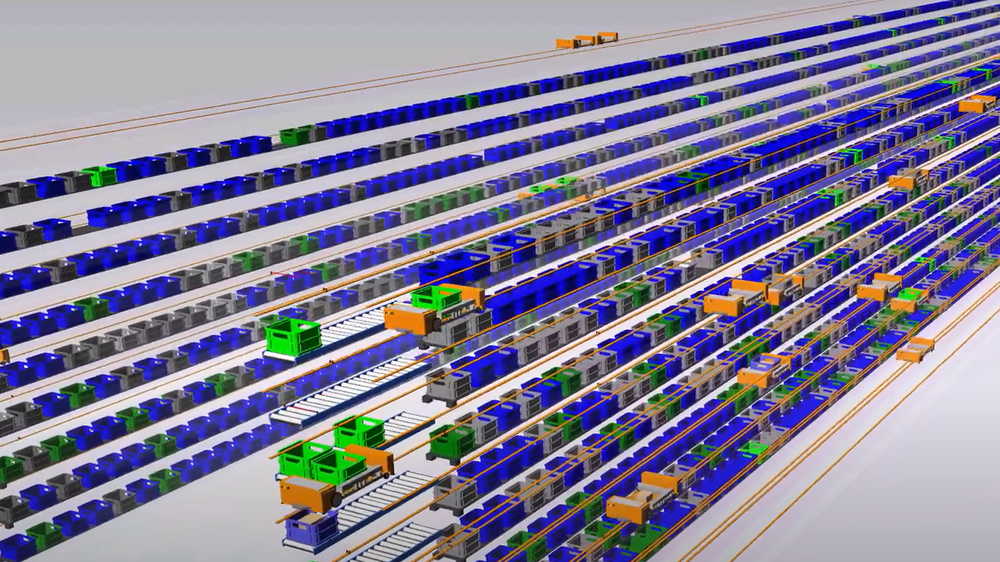
Simulation model of a robotic warehouse with storage aisles, robots and pick stations
A robotic warehouse model used to size an automated DC. Read the case.

Plant Simulation courses

Courses, from first frame to your own object library

Each course runs on-site for your team or live online in shorter sessions. We can also combine modules into one class built around your plant.

  • Beginner
  • 3 days on-site
  • or 6 online sessions

Plant Simulation Fundamentals

Build, run and read a material flow model in Siemens Plant Simulation. You start from an empty frame and finish with a working model of a small line.

  • Frames, the class library, and instances versus classes
  • Material flow objects: Source, SingleProc, ParallelProc, Buffer, Assembly, Dismantle, Drain and Line
  • Moving units, the EventController, and how simulated time advances
  • Failures, availability, shift calendars and workers
  • Statistics, charts, Sankey diagrams and the Bottleneck Analyzer
  • Checking the model against what the line actually did

Before you start: basic Windows skills and basic statistics. No simulation experience needed.
  • Intermediate
  • 2 days on-site
  • or 4 online sessions

SimTalk Programming

Write the methods that make a Plant Simulation model behave like your plant: routing rules, controls, data loading and reusable logic.

  • Methods, variables, attributes, conditions and loops
  • Entrance, exit and other controls on material flow objects
  • Names, paths and addressing objects from code
  • Tables: reading inputs and writing results
  • Init, Reset and EndSim methods
  • Debugging methods and finding slow code

Before you start: Plant Simulation Fundamentals or equivalent. Some programming helps but isn't required.

  • Intermediate
  • 1 day on-site
  • or 2 online sessions

Experiments and Analysis

Turn a working model into answers: set up experiments, run enough replications, and present results that a plant manager can act on.

  • The ExperimentManager: inputs, observed values and replications
  • Random number streams, warm-up and run length
  • Confidence intervals and comparing scenarios fairly
  • Exporting results to Excel for summary and charts
  • Telling a "what would happen if" story with the numbers

Before you start: Plant Simulation Fundamentals or equivalent.

  • Advanced
  • 2 days on-site
  • or 4 online sessions

High-Speed and Packaging Lines in Plant Simulation

Filling, capping, labeling, case packing and palletizing lines run thousands of units a minute. This course shows how to model them in Plant Simulation without a model that crawls.

  • Choosing the level of detail: units, batches or flow
  • Accumulation conveyors, buffers and line speed control
  • Turning downtime records into failure profiles
  • When the Fluids objects help with bulk and liquid steps
  • Unit changes from product to cases to pallets
  • Checking line efficiency and OEE against plant data

Before you start: Fundamentals and SimTalk, or equivalent experience. More on packaging line simulation.

  • Advanced
  • Length set to your scope

Custom Libraries and Model Templates

Build your company's own Plant Simulation objects and templates, so every new model starts from tested parts and loads its data from tables.

  • Designing reusable objects for your equipment
  • Standard input tables and models that build from data
  • Keeping a library consistent across sites and modelers
  • Documentation and versioning your team can keep up

Before you start: SimTalk experience. How we build simulation libraries.

  • All levels
  • By the session
  • Online or on-site

Model Review and Coaching

One-on-one or small-group sessions on your own Plant Simulation model. Bring the model and the question; we work through it with you.

  • A structured review of logic, data and validation
  • Pair-building the next part of the model
  • Speeding up slow models
  • Picking up a model someone else built

Before you start: a model, or a question you want one to answer. Under NDA when you need one.

Formats

On-site, live online, or one-on-one

Classes are small and taught live by Andy and Amber Siprelle. Every course has hands-on exercises with solution models you keep.

FormatHow it runsBest for
On-siteFull days at your plant or officeA team learning together on its own plant
Live onlineSessions of about 3 hours, with homework betweenSpread-out teams; keeping up with the day job
CoachingBooked sessions on your modelA modeler partway through a real project

Where to start

Which Plant Simulation course first?

  • New to Plant Simulation: Fundamentals, then SimTalk.
  • Models that need custom logic: SimTalk Programming.
  • Answers people will act on: Experiments and Analysis.
  • Food, beverage and consumer goods lines: High-Speed and Packaging Lines.
  • Several modelers or sites: Custom Libraries and Model Templates.

Plant Simulation licenses come from Siemens and its partners, and Siemens runs its own training too. We teach what you run on the license you have.

Keep learning

Free reading for Plant Simulation users

Questions

Is this official Siemens training?

No. SDI is an independent simulation consultancy that has used Plant Simulation on more than 50 projects. Siemens runs its own Tecnomatix courses. Ours are built around real projects and, when you want, your own models.

Who teaches the Plant Simulation courses?

Andy and Amber Siprelle teach every class. They bring SDI's 15+ years and more than 50 projects in Plant Simulation, and before that they wrote and taught SDI's ExtendSim courses.

Do we need a Plant Simulation license for the course?

Yes, each student needs Plant Simulation installed with a working license before class. Licenses come from Siemens and its partners.

Is it called Plant Simulation, PlantSim or Tecnomatix?

All three. The product is Siemens Tecnomatix Plant Simulation, often shortened to Plant Sim or PlantSim. Its scripting language is SimTalk.

Can the course use our own plant model and data?

Yes, and we recommend it. Team classes are built on a model of your line or plant. We sign an NDA whenever you need one.

Do you also teach ExtendSim?

Yes. We have 35+ years in ExtendSim and wrote its first official course. See ExtendSim training.

How much does Plant Simulation training cost?

It depends on the course, the number of people and the format. Tell us who needs training and on what, and we'll send a plan and a price.

Tell us your problem

Plan your Plant Simulation training

Who needs training, which course, on-site or online, and is there a model you want to teach from? We'll send a plan.

  • A straight answer on whether simulation is the right tool
  • Which tool fits, even if it isn't one we use every day
  • A rough scope and timeline, before any commitment

Or book a 30-minute call.

We reply within one business day. Prefer email? info@simulationdynamics.com